Items
The five row types, what each is for, and when each is fetched.
An overlay is a list of items. Each item is one row in the rail and one thing the pane can show. There is one source field per type and no mutually exclusive branches inside a type.
| Type | Source | Own URL | Fetched |
|---|---|---|---|
collection | slug | yes, unless hideEntities is on | on open |
global | slug | yes, unless hideEntities is on | on open |
component | component | no | with the page, or on open with lazy: true |
view | viewKey | yes | on open |
link | href | n/a | n/a |
Every type also takes label, group, icon, order, keywords, badge and access. A collection or global with no label or group inherits the ones it already declares.
collection
{ type: 'collection', slug: 'tags' }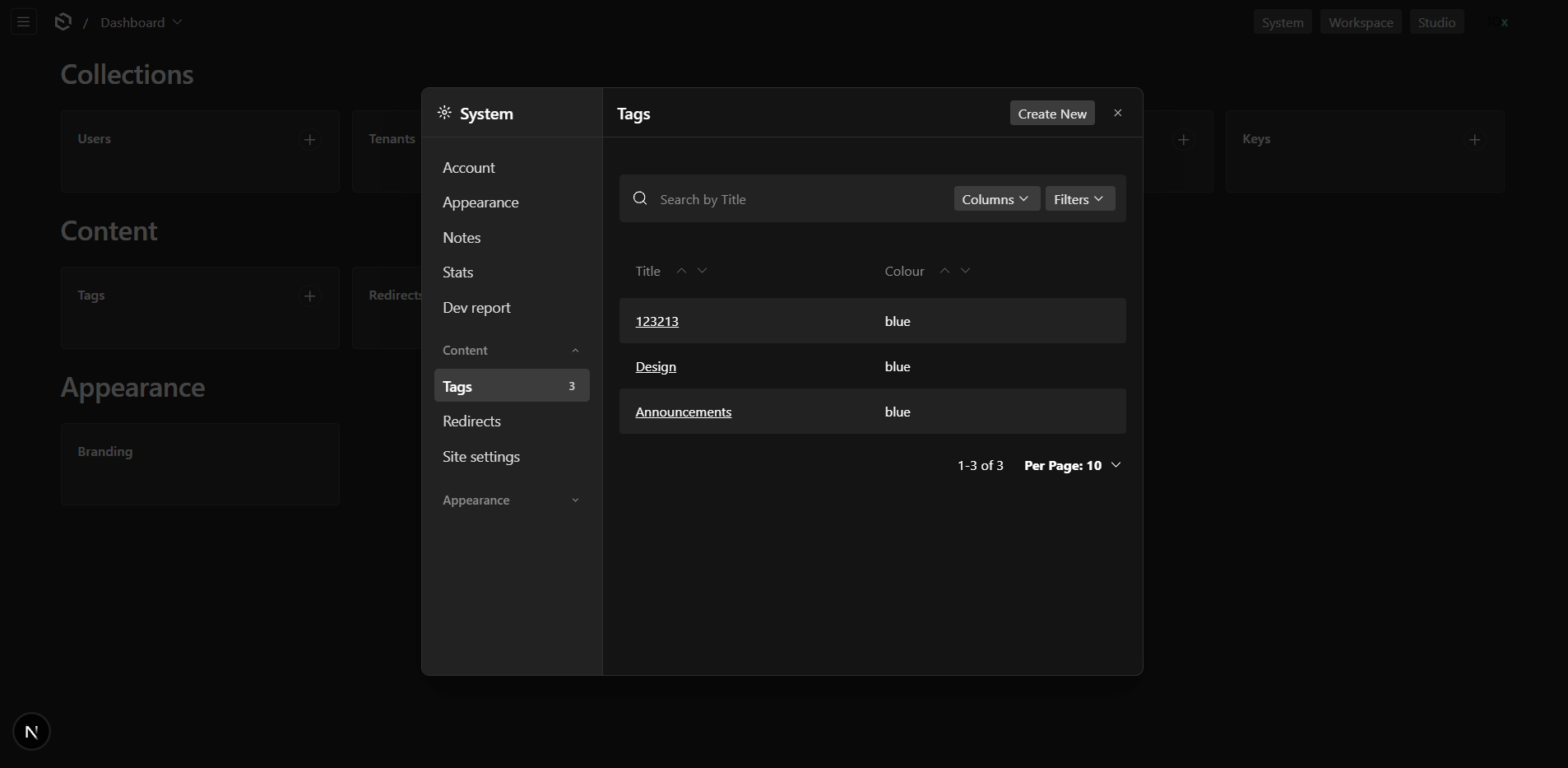
Renders Payload's list view in drawer mode, and its edit view when a row is picked. Creating, filtering, sorting, grouping, drafts, uploads and relationship drawers all work as they do on a page.
Delete, duplicate and "create new" sit in a dots menu on the edit view, as they do on a page, and a trashed document gets Restore and Delete permanently buttons instead. All of them act on the panel rather than navigating away from it. Delete honours trash when the collection has it, including the "delete permanently" option. The plugin appends these actions to the collection's admin.components.edit.beforeDocumentControls whether or not hideEntities is on; if the collection already sets that, the plugin's entry is added after yours. Duplicating into selected locales is the one action the panel does not carry.
The same collection can appear in more than one overlay. Each panel has its own rail, its own URL and its own render cache, so they do not interfere. The one thing they must agree on is hideEntities: hiding belongs to the entity rather than to the panel, and two overlays asking for opposite things is a boot error naming both.
What drawer mode leaves out
A panel is not a replacement for the collection's own views. Payload renders less in drawer mode than on a page, and the plugin does not add it back:
| Missing | Why |
|---|---|
| Trash tab | The list's view tabs render only outside a drawer, so a trashed document cannot be found from the panel. Open one by URL and restore and permanent delete are both offered. |
| Bulk delete, bulk edit | The list's selection actions render only outside a drawer, so the panel does not draw the selection column either. |
| API, Versions, Live Preview | The document header carries those tabs, and Payload skips the header when a drawerSlug is set. The Live Preview toggle is hidden in a drawer too. |
| Copy to locale | It lives in Payload's own document menu, which the panel replaces. |
| Duplicate into selected locales | Plain duplicate is there; the locale picker is not. |
This is why hideEntities is off by default. Turn it on for an entity that is genuinely settings-shaped, where none of the above is ever wanted; leave it off and the full views stay one nav click away.
resolveDocID
A collection that holds one document per something, rather than a list, can skip the list entirely:
{
  type: 'collection',
  slug: 'site-settings',
  resolveDocID: async ({ item, req }) => {
    const found = await req.payload.find({
      collection: item.slug,
      where: { owner: { equals: req.user?.id } },
      limit: 1,
      select: { id: true },
    })
    return found.docs[0]?.id ?? 'create'
  },
}
Return a document id to open it, 'create' for the create form, or null to fall back to the ordinary list. The row then leads straight into the document, and neither the back chevron nor the dots menu is drawn: the row stands in for a global, which has no list to return to and nothing to delete or duplicate.
The id is resolved on every open and is not written into the URL: "the current tenant's document" or "my profile" changes with who or what is selected, so a pinned id goes stale. A resolver that throws falls back to the list rather than removing the row.
tenantGlobalItem is the ready-made version for @payloadcms/plugin-multi-tenant globals:
import { tenantGlobalItem } from '@10x-media/settings-overlay/items'

items: [tenantGlobalItem({ slug: 'site-settings' })]
It reads the tenant cookie, finds that tenant's document, and creates the draft first when the collection has autosave enabled, because an autosave collection has no usable create form. The multi-tenant plugin is an optional peer dependency needed only by this helper; the plugin core knows nothing about tenants, only about resolveDocID.
global
{ type: 'global', slug: 'branding' }The same edit view a global gets on its own route, minus the document tabs, which Payload skips in drawer mode. Hidden from the nav only when hideEntities is on, as a collection is, and listable in several overlays on the same terms too.
component
{ type: 'component', slug: 'about', label: 'About', component: './About#About' }A component that exists only inside the panel. It may be a server or a client component: the plugin renders it the way Payload renders any custom component and hands server props only to the former.
By default it is rendered on the server with the rest of the page, so opening the row costs no request. That is right for anything that reads cookies, config or nothing at all. A component that reads the database should say so:
{ type: 'component', slug: 'usage', label: 'Usage', component: './Usage#Usage', lazy: true }A lazy component is fetched when the row is opened, with a real request, and never runs on a page load where nobody opened the panel.
Both forms receive settingsOverlayEmbed: a client component reads it with useSettingsOverlayEmbed(), a server component gets it as a prop. See Customization.
view
{ type: 'view', slug: 'audit', label: 'Audit log', viewKey: 'auditLogs' }A view already registered in admin.components.views, by yours or by another plugin. It receives the page props it was written for, so it works unchanged.
A registered view keeps its own route either way: hideEntities covers collections and globals, and the plugin never hides a view. The key must exist when this plugin runs, so settingsOverlay goes after whatever registers the view; a missing key is a boot error naming both.
A view that wraps itself in DefaultTemplate draws a second sidebar inside the panel unless it is told where it is. See Embedded views.
link
{ type: 'link', slug: 'account', label: 'Account', href: '/account' }Closes the panel and navigates, asking first if the open document has unsaved edits. href is relative to the admin route. The destination is a new history entry whatever the overlay's history option says, so the back button returns the reader to the panel as they left it.
Groups
A row with a group joins that heading; rows without one form the ungrouped block, which always renders first.
Groups are collapsible, like the admin's own nav groups. The reader's choice is stored per overlay under this plugin's own preference key, so a panel group called "Content" and a sidebar group of the same name do not collapse each other. It is read back on the server, so the rail arrives in the state they left it.
The ungrouped block has no heading, so there is nothing to collapse it by and it always renders open.
To change how a group renders, or to stop it collapsing, replace the RailGroup slot:
'use client'
import { SettingsRailItems } from '@10x-media/settings-overlay/client'

export const Group = ({ group }: { group: { label: null | string } }) => (
  <section>
    {group.label && <h4>{group.label}</h4>}
    <SettingsRailItems group={group.label} />
  </section>
)
Ordering
Items and groups keep the order they were declared in, with the ungrouped block first. order moves a single row:
{ type: 'link', slug: 'account', label: 'Account', href: '/account', order: 100 }For anything more, the overlay takes sort functions:
sort: {
  groups: (group) => group.label ?? undefined,
  items: (item, group, { locale }) => item.slug,
}
Returning undefined means "leave it where it was", which is what makes the sort stable: only rows the function has an opinion about move, and keyed rows sort before unkeyed ones.
Badges
{ type: 'collection', slug: 'imports', badge: { type: 'collection-count' } }
{ type: 'link', slug: 'queue', href: '/queue', label: 'Queue', badge: { type: 'api', endpoint: '/api/queue/pending', responseKey: 'count' } }
{ type: 'component', slug: 'inbox', label: 'Inbox', component: './Inbox#Inbox', badge: { type: 'provider', slug: 'inbox' } }
collection-count and api are fetched by the plugin and cached for a minute; a rail badge is a hint, not a live counter. provider reads a value you publish yourself:
import { BadgeProvider } from '@10x-media/settings-overlay/client'

<BadgeProvider values={{ inbox: unreadCount }}>{children}</BadgeProvider>
A host value always wins over one the plugin fetched.