Banner
The admin banner, per-window messages, lock value tokens and message locales.
The banner sits above the admin on every page and shows one window at a time.
- Active windows first, the largest scope first; then announcements, the soonest first.
- On a collection or global, only windows covering it; the same on the pages of a custom target with a
path. Elsewhere, all of them. - A pager (
1/3) moves between windows. Dismissing an announcement reveals the next; the dismissal is stored in the user's preferences, so it follows them across devices, and comes back if the window is rescheduled. Active windows cannot be dismissed. - The page refreshes itself when a shown window starts or ends.
Messages
Without a message, the banner says what is frozen and when, in the admin language: Maintenance in progress Read-only: Catalog. Until 13:00. Write your own per window and per stage in the During the lock and Announcement tabs. The announcement tab appears once Announce is on.
Messages are localized rich text (bold, italic, links), so they can be translated before the window is published.
Lock values
The editor's toolbar, + menu and slash menu insert tokens for the window's own values, which follow the window when it changes:
| Token | Renders |
|---|---|
| Start | The window's start. |
| End | Its end, when End at time is on. |
| Announcement | Its announcement date, when announced. |
| Scope | What it freezes, as the group and entity labels. |
| Date | A fixed date you pick. |
Dates render in the viewer's time zone and admin language, as a date and time, a date, a time, or relative ("in 2 hours"), which updates live. A token picks up bold and italic like text. The editor previews tokens with the form's current values, and one the window cannot fill (an end on a window without one) is flagged in the editor and renders as nothing.
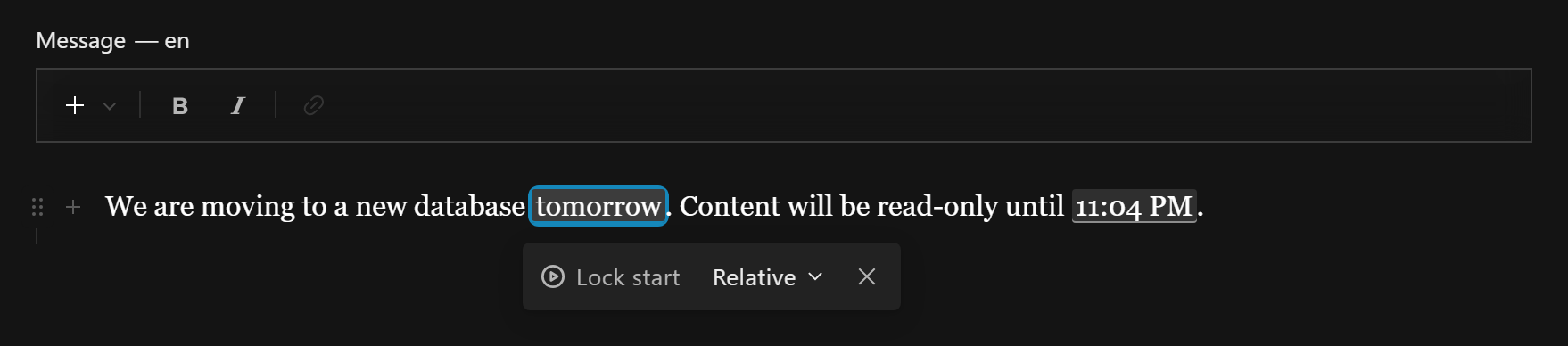
Message locale
A viewer sees the message in their admin language when it is also a content locale, otherwise in the default locale. Map the two when their keys differ:
contentLock({
  localeMap: { en: 'en-US', de: 'de-DE' }, // admin language -> content locale
})
A window not translated into the viewer's locale falls back to the default locale's message, then to the built-in text.
Extending the editor
Add Lexical features to the message editor the same way you would to any field, and tell the banner how to render the nodes they bring:
import { UnderlineFeature } from '@payloadcms/richtext-lexical'

contentLock({
  editor: {
    features: [UnderlineFeature()], // or ({ defaultFeatures }) => [...]
    converters: '/components/lockConverters#converters',
  },
})
converters is an import-map path to a JSXConvertersFunction; it receives the plugin's converters as defaultConverters. Regenerate the import map after changing it.