Enforcement
What a lock blocks, how clients see it, and how server code can check it.
What is blocked
On every collection and global in scope, while a window is active:
| Operation | Collections | Globals |
|---|---|---|
| create | blocked | |
| update, including bulk updates | blocked | blocked |
| delete, including bulk deletes | blocked | |
| autosave and version restore | blocked | blocked |
| find, count, read | allowed | allowed |
This applies on every channel: REST, GraphQL, the admin, custom endpoints, and the Local API with overrideAccess: true. No option, role or user bypasses it; only server code running inside withoutContentLock does (see Maintenance code). Bulk operations are rejected as a whole.
Logins, token refresh, logout and password resets keep working.
What clients receive
A blocked write throws ContentLockedError, an APIError with status 503:
{
  "errors": [{
    "message": "Content is locked for maintenance. Please try again later.",
    "data": { "endsAt": "2026-01-10T13:00:00.000Z", "lockIds": ["..."] }
  }]
}endsAtis the latest known end of the active windows, ornullwhen any of them ends manually.- The response carries
Retry-After: 3600 seconds by default, or the seconds until the known end withretryAfter: 'untilEnd'. GraphQL errors carry it too, withextensions.statusCode: 503. - The message is translated to the request's language.
- The error logs at
info, not as a server fault.
In server code, check with isContentLockedError(error).
The admin
During a lock, create, update and delete access is denied in scope, so the admin renders documents read-only and hides the buttons that would fail. Outside a lock and out of scope, your access functions apply unchanged. Read access is never touched.
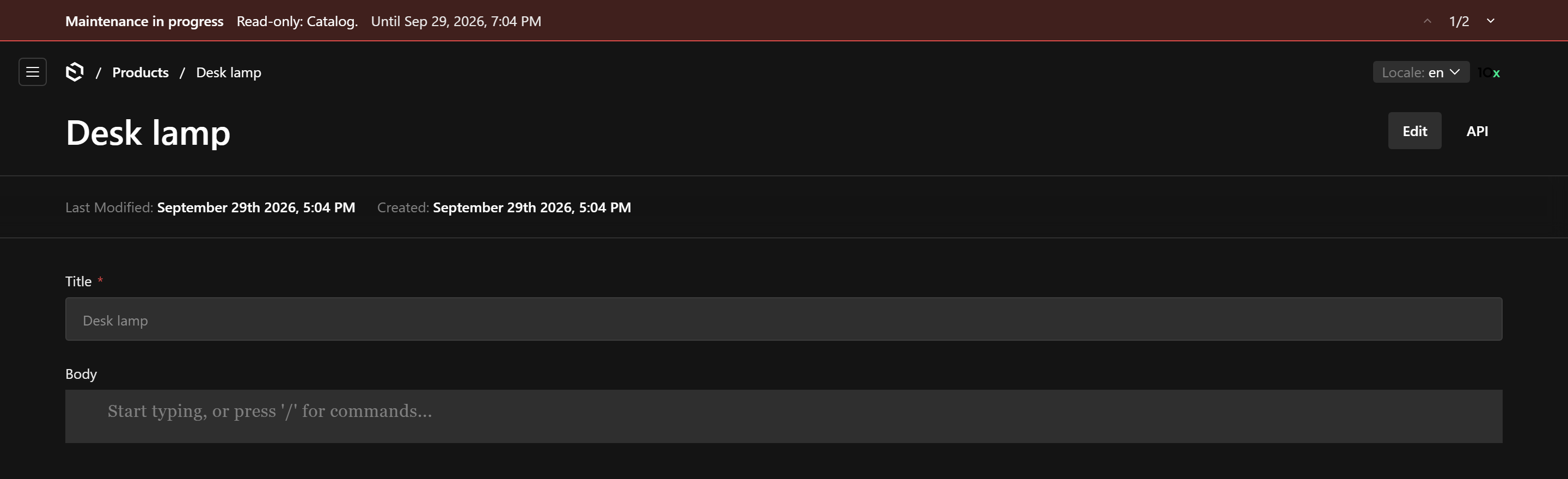
A page opened before the lock started still shows editable fields until it refreshes; saving it answers with the 503 toast. The banner refreshes the page when a window it shows changes stage.
Checking the lock in server code
import { getContentLockState, isContentLocked } from '@10x-media/content-lock'

if (await isContentLocked(payload, { collection: 'products' })) {
  return // skip, or postpone the work
}
// also { global: 'header' }, or { custom: 'crm-sync' } for a custom target

const state = await getContentLockState(payload)
// { locked, scope, endsAt, active, announced, resolvedAt }
Code that must not start work a lock would stop halfway asserts instead: assertContentUnlocked throws the lock's own ContentLockedError, so a job treats it like a blocked write and defers or fails per its interruption policy, before it has paid for anything.
import { assertContentUnlocked } from '@10x-media/content-lock'

// inside a task handler
await assertContentUnlocked(req, { collection: 'products' })
const body = await translate(input.body) // only paid for while products is writable
await req.payload.update({ collection: 'products', id: input.id, data: { body }, req })
In custom admin components, useContentLock() from @10x-media/content-lock/client returns { state, locked, isLocked(entity), endsAt, activeWindow }. Exempt collections and globals never count as locked, on the server or in the admin.
Timing
A lock that starts or ends reaches every server within a few seconds. Servers share the windows through a snapshot in payload.kv, and a server rebuilds it from the collection when it is missing or more than a minute old.
- A server that cannot store the snapshot it rebuilt logs the error and enforces the windows it read from the collection.
- Saving or deleting a window fails while its snapshot cannot be stored, since the other servers would keep the old one for up to a minute.
- If the lock state cannot be read, because kv does not answer or the collection cannot be read for a rebuild, writes are rejected until it can.
Maintenance code
A lock keeps editors, integrations and jobs out while you change the content yourself: a migration, an import, a restore. Run that code inside withoutContentLock so its own writes go through:
import { withoutContentLock } from '@10x-media/content-lock'

await withoutContentLock(async () => {
  await payload.update({
    collection: 'products',
    where: { legacySku: { exists: true } },
    data: { legacySku: null },
  })
})- Everything the callback runs is covered: nested Local API calls, the hooks they fire and the writes those make, and work it starts and leaves running.
- Requests handled at the same time stay locked. Only the callback's own async chain is let through.
- Open it after Payload is initialized, and start no server, worker, cron or interval inside it: anything created inside keeps the lock lifted for as long as it runs. Jobs it queues run later, outside the scope, and meet the lock like any other job.
- The lock itself stays in place: the banner,
isContentLocked,getContentLockStateand paused queues report it as before. - Keep it to trusted maintenance code. Never wrap a request handler, a custom endpoint or a job run in it.
Limits
- Writes through
payload.db.*or the raw database driver are not blocked. Code that writes this way should checkisContentLockeditself. - Frontend writes to collections in scope get the same 503. List them in
exemptif they must keep working.