Content Lock
Planned and unplanned maintenance windows that freeze content on every channel.
@10x-media/content-lock freezes content while you do something to it that editors must not race: a database migration, a bulk import, a content audit, a relaunch. While a lock is active, every write to the frozen collections and globals is rejected, the admin turns read-only, and a banner tells everyone why and until when.
import { buildConfig } from 'payload'
import { contentLock } from '@10x-media/content-lock'

export default buildConfig({
  plugins: [contentLock({})],
})
That adds a Content locks collection. Create a window in it (or press Lock now in its list) and the lock is on.
How it works
A lock is a document in the content-locks collection: a window with a start, an optional end, an optional announcement, and a scope. Many windows can exist at once, scheduled weeks ahead or started on the spot. Each moves through its stages (pending, announced, active, ended) on its own as time passes.
While a window is active:
- Writes are rejected on every covered collection and global: create, update, delete, autosave and version restores answer
503with aRetry-Afterheader. This holds on REST, GraphQL, the admin, and the Local API, includingoverrideAccess: true. - The admin turns read-only in scope: documents open read-only, and Save, Create and Delete are hidden.
Reads are never affected. The plugin's own collection and Payload's system collections (preferences, locked documents, jobs, kv, migrations) are always writable, so logins, preferences and the lock itself keep working.
What editors see
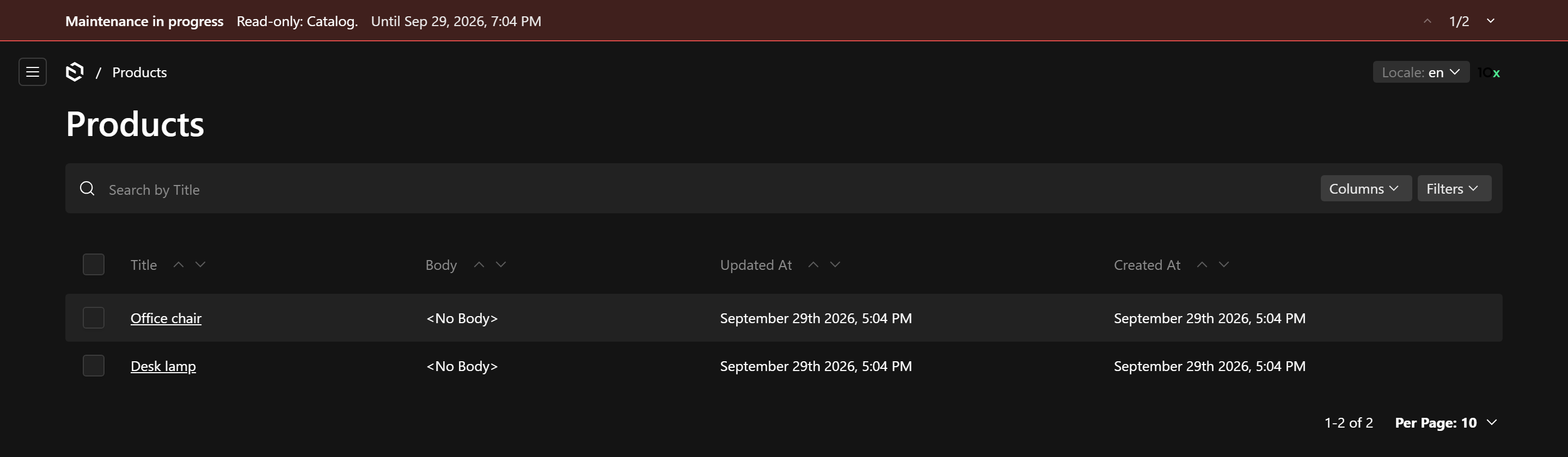
- A banner above the admin, one window at a time with a pager: what is frozen, from when, until when, or a message you write per window and per locale.
- Announcements before the lock, dismissible per user. An active lock cannot be dismissed.
- Read-only documents in scope, with collections out of scope untouched.
When to use it
Whenever a change to stored content needs the content to hold still: migrations and reindexes, imports that overwrite editorial data, restoring a backup, a freeze before a launch. Scope a window to a group (the catalog, the website) so the rest of the admin keeps working, or lock everything.
Next
Start with the quick start, then read windows for the lifecycle and enforcement for exactly what is blocked.