Customization
Slots for the chrome, the headless mode, and translations.
Slots
The chrome is slots. A slot is a Payload component rendered on the server with serializable props (collection, variant, and step for step-level slots); the live half (current step, guard state) reaches its client parts through the hooks in @10x-media/form-variants/client.
| Slot | Default |
|---|---|
Layout | Wraps everything a variant renders |
Progress | A rail of the visible steps, with the passed ones marked and failing ones carrying an error pill. Renders nothing for a single step |
StepHeader | Description of the current step, and its label too when no progress rail is on screen to show it already |
Navigation | The footer: one status line, Back, and one primary button (Next, or the save controls on the final step) |
VariantSwitcher | Shown when two or more variants are available, including on native |
Outcome | Shown after finish(outcome) or an outcome after-save action |
Slots can be set plugin-wide (formVariants({ components })), per collection (components next to variants), per variant, and per step (Progress, StepHeader, Navigation only). The most specific wins. native has no slots of its own; the switcher shown on it comes from the collection or plugin level.
Setting Progress, StepHeader, Navigation or VariantSwitcher to false hides that part at that level, and a more specific level can still bring it back with a component. A one-step variant usually wants components: { Progress: false }; a component step that draws its own buttons wants components: { Navigation: false }. A custom Layout built from ProgressSlot, StepHeaderSlot and NavigationSlot respects false the same way.
formVariants({
  components: {
    Progress: '/components/StepCounter#StepCounter',
  },
})'use client'
import { useWizard } from '@10x-media/form-variants/client'
export const StepCounter = () => {
const { count, index, step } = useWizard()
if (count < 2) return null
return (
<p>
Step {index + 1} of {count} — {step?.label}
</p>
)
}count is the number of visible steps, so a step whose condition turned false is already out of the total and the counter moves with it. The same component works as a per-step Progress, inside a replaced Navigation, or anywhere in a custom Layout: it reads the wizard rather than its own position.
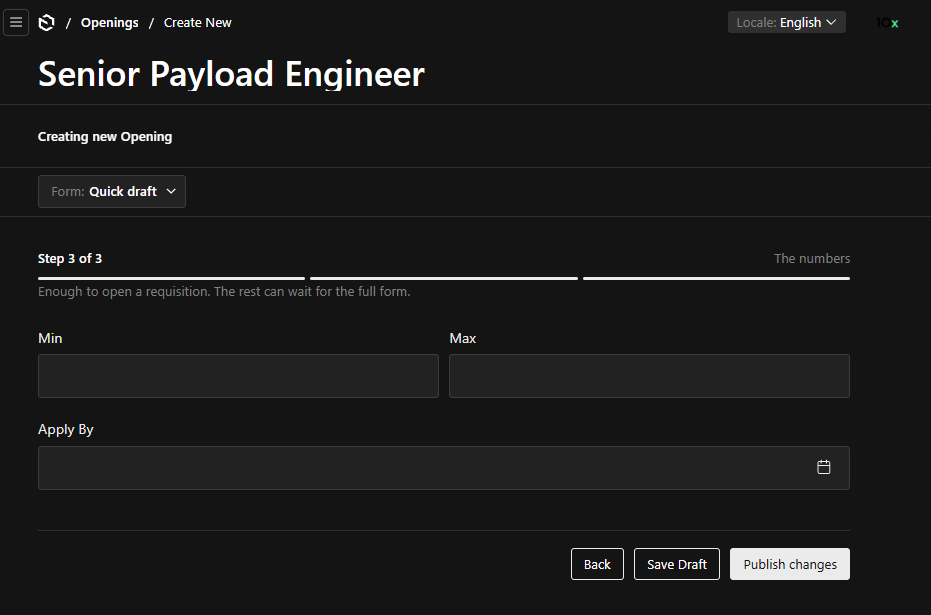
The save controls in that footer are Payload's own, on the last step because the variant saves there. Nothing about the replaced slot changed them.
Headless
Replacing Layout and building from the hooks is the headless mode. The pieces are exported so a custom layout does not restate them:
| Export | Renders |
|---|---|
StepBody | The current step's fields or component |
ProgressSlot, StepHeaderSlot, NavigationSlot, OutcomeSlot | The resolved slot at that level, falling back to the built-in |
Progress, StepHeader, Navigation, Outcome, VariantSwitcher | The built-ins themselves |
SaveControls | The save buttons, so a replaced Navigation does not restate them |
'use client'

import { NavigationSlot, ProgressSlot, StepBody, useFormVariants, OutcomeSlot } from '@10x-media/form-variants/client'

export const TwoColumnLayout = () => {
  const { outcome } = useFormVariants()
  if (outcome) return <OutcomeSlot />
  return (
    <div className="two-column">
      <aside><ProgressSlot /></aside>
      <main><StepBody /><NavigationSlot /></main>
    </div>
  )
}
The variant's top bar, with the document status and the save controls, always renders above the layout and is not a slot.
Styling
Every class is stable and prefixed form-variants__. Defaults are declared with zero specificity, so a host rule wins regardless of stylesheet order, and every colour and metric is a Payload theme variable:
.form-variants {
  --form-variants-border: var(--theme-elevation-150);
}
Translations
The plugin ships ar, de, en, es, fr, id, ko, pt, ru, uk and zh. Override any of them, or add a locale it does not ship, through the plugin option:
import { keys } from '@10x-media/form-variants/i18n'

formVariants({
  translations: {
    de: { [keys.next]: 'Weiter', [keys.back]: 'Zurück' },
  },
})
Variant, step and field labels are Payload label types (a string, a per-locale record, or a LabelFunction), resolved per request. A LabelFunction's t is typed on Payload's own keys, so a label from a consumer namespace needs the consumer's typed translator or a cast.