Reactions
Emoji reactions on messages, with a per-person limit, two storage modes that never lose a concurrent reaction, and UI for the admin and a website.
import { conversations } from '@10x-media/conversations'
import { reactions } from '@10x-media/conversations/reactions'

conversations({
  slug: 'comments',
  // ...
  extensions: [reactions({ emojis: ['👍', '❤️', '🎉', '👀'], maxPerUser: 3 })],
})
In the admin that is all: the extension adds its own slots, so every message gets a row of reaction pills under its body and a quick row of emoji at the top of its "⋯" menu. Run pnpm payload generate:importmap once.
Options
| Option | Type | Default | |
|---|---|---|---|
emojis | string[] | ['👍', '❤️', '😂', '🎉', '👀', '✅'] (DEFAULT_EMOJIS) | The emoji people can pick, in picker order. Anything else is a 400 |
maxPerUser | number | no limit | Different emoji one person may put on one message |
onLimit | 'reject' | 'replace' | 'reject' | At the limit: refuse the new one (409), or drop the person's oldest reaction there |
storage | 'collection' | 'message' | 'collection' | Where reactions live, see below |
allowReadOnly | boolean | false | Keep reactions open in channels the viewer can read but not post in |
hooks.afterReaction | function | Called after a reaction was really added or removed |
With maxPerUser: 1, onLimit: 'replace' a reaction simply changes, like a single vote.
Storage
Both modes return the same data to the browser, so the UI and your code do not change with them.
collection (default) keeps one row per message, user and emoji in an <instance>-reactions collection, with a unique index on the three. Adding is an insert: two people reacting at once both land, and adding the same reaction twice hits the index and is a no-op. Counts are computed when messages are read, one query per page, so there is no counter to drift. The collection is closed like the core's.
message keeps a JSON list (userKey, emoji, at) and a version number on the message itself: no extra collection, no extra query per page, and a reaction moves the message's updatedAt in the same write. Writes to one message are serialized so none is lost:
- Mongo: a compare-and-set on the version number, one atomic
findOneAndUpdate, retried up to 8 times with jitter, then a 409. - Postgres and other SQL adapters: Payload's conditional update is a select then an update, so it cannot compare-and-set. Instead a transaction takes the row lock with a first update, reads, and writes.
Pick message for busy chats where the extra query per page matters, and collection when a message can collect many reactions from many people (the list is read and rewritten in full on each change).
Changing modes on a live project does not move existing reactions. On Postgres either mode changes the schema (collection adds a table, message two columns on the messages table), so create a migration after adding the extension.
Behaviour
- Read-only channels are frozen. In a channel the viewer can read but not post in (a closed ticket, an archived room), adding and removing both answer 403, and the UI shows the pills without letting anyone change them.
allowReadOnly: trueopens them there, for announcement channels where few post and everyone reacts. The check costs no query: it comes from the same access check that finds the message. - Deleted messages keep their reactions. A placeholder shows them; nobody can add new ones, but people can still take their own back. The reactions go only with the target document.
- The limit holds under concurrency. In
collectionmode the limit is checked after the insert, so concurrent adds from one person never end above it. - Other viewers see changes through the usual change signal: every real change moves the message's
updatedAtand publishes on the instance's transport.
Endpoints
| Endpoint | Body | |
|---|---|---|
POST /api/conversations/<instance>/reactions/add | { message, emoji } | Idempotent: adding an existing reaction changes nothing |
POST /api/conversations/<instance>/reactions/remove | { message, emoji } | Idempotent: removing a missing one changes nothing |
They are not a toggle, so a retried request never flips a reaction back. Both answer { message, authors }: the message as the core returns it, with fresh reactions.
The data
Every message a response carries has its reactions at message.ext.reactions, in the order each emoji was first used:
type ReactionSummary = {
  emoji: string
  count: number
  mine: boolean // the viewer is among them
  users: Array<{ userKey: string; name: string }> // the first 10, for a tooltip
}
The instance settings reach the browser as client data (useExtension('reactions')): { emojis, maxPerUser, onLimit, allowReadOnly }.
Notifications
reactions({
  hooks: {
    afterReaction: async ({ req, instance, message, emoji, userKey, operation }) => {
      if (operation === 'add' && message.authorKey !== userKey) {
        await req.payload.jobs.queue({ task: 'notifyReaction', input: { messageId: message.id, emoji, userKey } })
      }
    },
  },
})
It runs only when something really changed: not on a repeated add, not on removing nothing. With onLimit: 'replace' the dropped reaction arrives as its own remove call. Reaction writes skip collection hooks, so this is the hook. It is awaited inside the request, and an error fails the request after the change is saved, so enqueue a job rather than sending mail inline.
Admin UI
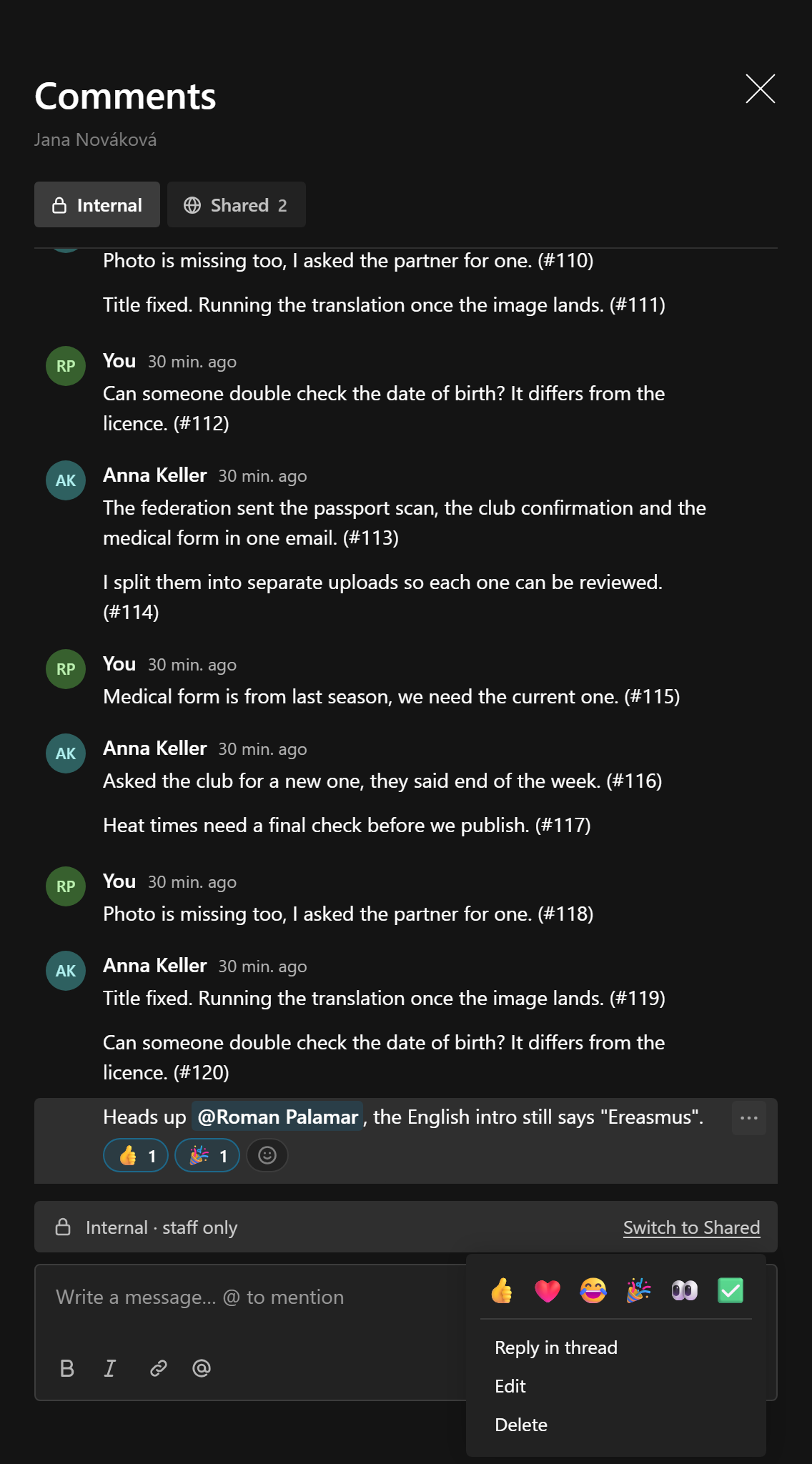
The extension registers two slots, after any of the host's:
messageFooter:ReactionsBar, the pills with counts. Clicking a pill toggles your own reaction; hovering names who reacted. An add button at the end opens the emoji row.messageQuickActions:ReactionQuickActions, the emoji row at the top of each message's menu.
Both are exported from /client if you arrange messages yourself. Emoji the limit refuses are disabled (reject) or replace your oldest one on click (replace), optimistically, with the server's answer merged back.
Website UI
useReactions() from @10x-media/conversations/reactions/react carries all the behaviour, with no @payloadcms/ui import:
| Returns | |
|---|---|
emojis | The allowed emoji, in picker order |
summaries(message) | message.ext.reactions, or [] |
mine(message) | A Set of the viewer's emoji on it |
isBlocked(message, emoji) | The limit refuses this emoji here (reject mode) |
readOnly(message) | The channel is read-only for the viewer and reactions are frozen there |
toggle(message, emoji) | Adds or takes back the viewer's reaction: shown at once, confirmed by the server, rolled back on error |
limit | The client data: { emojis, maxPerUser, onLimit, allowReadOnly } |
'use client'
import type { WindowMessage } from '@10x-media/conversations/react'
import { useReactions } from '@10x-media/conversations/reactions/react'

export function Reactions({ message }: { message: WindowMessage }) {
  const reactions = useReactions()
  const frozen = reactions.readOnly(message)
  return (
    <div>
      {reactions.summaries(message).map((entry) => (
        <button
          key={entry.emoji}
          aria-pressed={entry.mine}
          disabled={frozen || reactions.isBlocked(message, entry.emoji)}
          onClick={() => void reactions.toggle(message, entry.emoji)}
          type="button"
        >
          {entry.emoji} {entry.count}
        </button>
      ))}
    </div>
  )
}
The shadcn registry has a ready item, conversation-reactions, with ReactionsBar, ReactionQuickActions and a reactionSlots object to pass to ConversationUIProvider:
<ConversationUIProvider slots={reactionSlots}>
  <ConversationPanel conversationKey={key} />
</ConversationUIProvider>
See shadcn registry for installing it.