Messages
Sending, editing and deleting, custom message types, server helpers, hooks, and the instance endpoints.
Sending
A browser sends through POST /api/conversations/<slug>/messages, which the admin components and the headless hooks do for you:
{ "key": "collection:tickets:12", "channel": "conversation", "text": "Hello", "clientId": "0b7c…" }- Conversation access and the channel's
createright are checked forkey. - For a reply (
parentset), the root is loaded. It must be a root of the same conversation and still shown. The reply takes the root's channel; the client'schannelis ignored. - If the author already has a message with this
clientId, that message is returned: a retry after a lost response never posts twice. bodyis Lexical JSON validated against the instance editor.textis plain text, wrapped into one paragraph with line breaks. One of them is required.- The server derives
text(the plain-text projection, with mentions as@Name) andmentions(user keys, checked as described in Access). - The author's read cursor moves to the new message.
afterMessageandafterMentionrun, then the transport signals the change.
The response is { message, authors, root? }. For a reply, root is the root as it is now, with its new replyCount, so the sender's feed updates at once.
Limits and validation
| Rule | Default | Answer |
|---|---|---|
limits.bodyLength: characters of the plain-text projection | 10 000 | 400 |
limits.bodyBytes: bytes of the serialized Lexical body | 64 KiB | 400 |
| Empty message (no text and no mention) | 400 | |
Link schemes other than http, https, mailto | 400 | |
| Mentions per message | mentions.max, 20 | extra ones are kept as text |
bodyBytes exists because text length alone lets empty paragraphs, formatting nodes or long style strings grow a row without bound.
These rules live in the messages collection's hooks, so the Local API enforces them too.
Editing
PATCH /api/conversations/<slug>/messages/:id with { body } or { text }. The channel's update rule decides (default: the author only), a read-only conversation refuses, and only text messages can be edited. The server sets editedAt and derives text and mentions again. afterMention receives only mentions that were not in the previous version, so an edit never notifies someone twice.
key, channel, parent, type and authorKey never change after a message is written, through any API.
Deleting
DELETE /api/conversations/<slug>/messages/:id. The channel's delete rule decides (default: the author only), and a read-only conversation refuses.
Deleting is a soft delete that wipes content on the server: body, text, mentions and data are cleared and deletedAt is set. authorKey, the thread counters and fields stored by extensions stay. What the feed shows depends on deleted:
deleted | A deleted root with replies | A deleted root without replies | A deleted reply |
|---|---|---|---|
'placeholderIfReplies' (default) | "Message deleted" placeholder, thread still opens | removed from the feed | removed, the root's replyCount goes down |
'placeholder' | placeholder | placeholder | placeholder, still counted in replyCount |
Under the default, a placeholder root disappears once its last reply is deleted too. lastReplyAt is not recomputed after a delete.
The row stays in the database until its target is deleted. See Production notes.
Custom message types
Messages other than chat text, such as a status change on a ticket, are custom types with typed data:
import { defineMessageType } from '@10x-media/conversations'

export const statusChange = defineMessageType<{ from: string; to: string }>()({
  slug: 'ticket.status',
  Component: '/components/StatusChange#StatusChange',
  validate: (data) => (data?.from && data.to ? true : 'from and to are required'),
  clientCreatable: false,
})conversations({ slug: 'tickets', types: [statusChange] /* … */ })slugmust be unique in the instance, andtextis reserved. Extensions can register types inbefore; the same slug from two parties throws, naming both.validateruns on create (and on any update that changesdata) and returnstrueor a reason, which becomes the 400 message.clientCreatable: truelets browsers send the type through the endpoint, aftervalidate. Otherwise only server code can post it, withpostMessage.- A type has no visibility of its own: the message's channel decides who sees it.
- Only
textmessages can be edited. Any type can be deleted. layoutdecides how much of the row theComponentowns (below).
Component is a Payload component path, resolved through the import map. A client component renders directly with { message, conversationKey, instance }. A server component receives { message, conversationKey, instance, channel?, req, locale, permissions } and renders after mount through a server function, after the plugin checks the viewer can read the message. By default that is Payload's render-widget, through a dashboard widget the plugin registers, so a "Conversations (internal)" entry appears in the dashboard's Add widget drawer; serverComponents: 'server-function' uses the plugin's own function instead, registered in your layout (see Slots). Server components cost one request per message on screen; prefer client components for types that are common.
import type { ChatServerSlotProps } from '@10x-media/conversations/rsc'

export const StatusChange = ({ message }: ChatServerSlotProps) => {
  const data = (message?.data ?? {}) as { from?: string; to?: string }
  return <div>Status changed from <strong>{data.from}</strong> to <strong>{data.to}</strong></div>
}
Layout: in the message frame, or the whole row
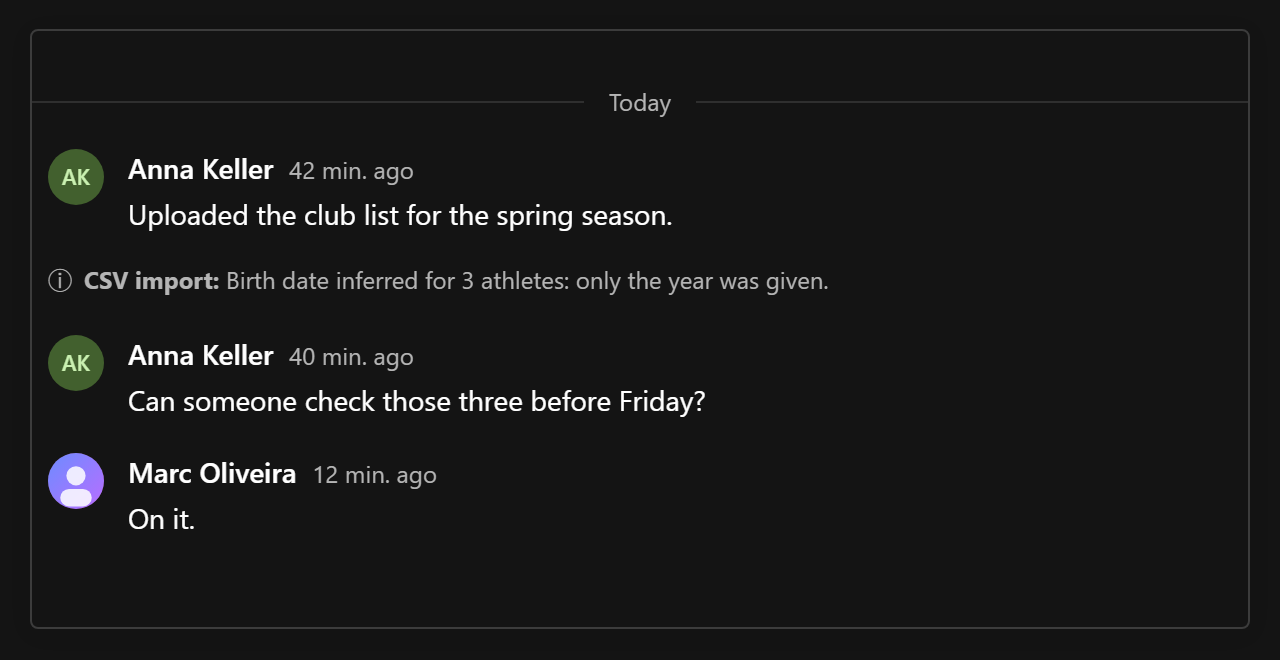
By default (layout: 'message') a type's Component stands in for the body only: the avatar, the author's name and the time stay around it, as for a chat message. That suits content someone posted, such as a status change a person made.
layout: 'bare' hands the component the whole row. There is no avatar and no name line, the time shows on hover next to the menu, and the row is never grouped with its neighbours, nor does it group the message after it. The menu (reply in thread, extension items), the thread summary and what hangs under a message, such as reactions, stay. Use it for system notes and one-line events ("Anna joined", "Imported from CSV"):
export const systemNote = defineMessageType<{ text: string }>()({
  slug: 'system.note',
  Component: '/components/SystemNote#SystemNote',
  layout: 'bare',
  validate: (data) => (data?.text ? true : 'text is required'),
})'use client'
import type { ChatSlotProps } from '@10x-media/conversations/client'
export const SystemNote = ({ authors, message }: ChatSlotProps) => (
<div className="system-note">
<strong>{message && authors?.[message.authorKey]?.name}:</strong>{' '}
{(message?.data as { text: string }).text}
</div>
)A client component gets the view's authors map, so a one-line event can name people itself. The layout of every type travels to the browser with subscribe, so website components and the headless hooks draw and group bare rows the same way (useMessage().bare).
In the admin, a message whose type has no Component (and no renderType in the view) renders as "This message cannot be shown here". Admin views and website components also take a renderType prop to draw types in code; see Admin UI.
Server helpers
postMessage
Posts a message of any type from a hook, a job, a seed or an endpoint of your own, without instance access checks:
import { postMessage } from '@10x-media/conversations'

await postMessage(req, {
  instance: 'tickets',
  key: `collection:tickets:${ticket.id}`,
  channel: 'conversation',
  type: 'ticket.status',
  data: { from: previous.status, to: ticket.status },
  author: `users:${req.user.id}`,
})| Argument | |
|---|---|
instance | The instance slug |
key, channel, parent? | Where the message goes; a reply takes its root's channel |
text or body | For text messages |
type, data | For custom types |
author | A user key, or { system: name } for a system author. Default: the signed-in user of req. Without either, the call fails |
ext | Data for extensions, by name, e.g. { attachments: [fileId] }. Each extension's send hook reads its part, trusted |
Collection hooks run as for a message from the admin: validation, derived fields, counters, afterMessage, afterMention, and the transport signal. The author's read cursor moves, as it does after a send. It returns the stored message.
touchMessage
Anything a feed shows must move its message's updatedAt, because that is what change detection watches. An extension that keeps data outside the message row calls:
import { touchMessage } from '@10x-media/conversations'

await touchMessage(req, { instance: 'comments', id: message.id })
It updates updatedAt without running hooks and signals the transport.
getInstance and projectUsers
getInstance(req, slug) returns the resolved instance of a booted Payload: its collection slugs (messagesSlug, readsSlug), channels, targets, types and access helpers. projectUsers(req, instance, userKeys) returns an authors-shaped map for any user keys, for extension data that names people.
System authors
Server code often writes in no person's name: an import, a scheduled job, an integration. Post as a system author instead of borrowing a user:
conversations({
  slug: 'comments',
  systemAuthors: {
    import: { name: { en: 'CSV import', de: 'CSV-Import' } },
    sync: { name: 'CRM sync', avatar: '/icons/crm.svg' },
  },
  // ...
})

await postMessage(req, {
  instance: 'comments',
  key: collectionKey('persons', person.id),
  channel: 'internal',
  author: { system: 'import' },
  type: 'system.note',
  data: { text: 'Birth date inferred from the CSV import (only the year was given).' },
})
The message stores authorKey: 'system:import' (systemKey('import')), and the authors map shows it as { name, avatar, system: true }, named in the viewer's language. A name missing from systemAuthors shows as "System". A system author is not a person: it has no read cursor, cannot be mentioned, and its messages count as unread for everyone. Edit and delete follow the channel's update and delete rules, whose default (the author only) leaves system messages untouched. No users collection may be named system.
Paired with a layout: 'bare' type this gives a note that reads as coming from the system, with a thread to discuss it and reactions to acknowledge it.
Hooks
hooks: {
  afterMessage: async ({ req, message, operation }) => {
    // operation: 'create' | 'update' | 'delete'
  },
  afterMention: async ({ req, message, users, key, channel }) => {
    await req.payload.jobs.queue({ task: 'notifyMention', input: { messageId: message.id, users } })
  },
}afterMessageruns after every create, edit and delete (a soft delete reportsdelete).afterMentionruns with the users newly mentioned in a message, as{ collection, id }refs, never again for the same user on an edit. Each passed the mention rules, so each can read the message.- Both run inside the request, after the row is written: an email sent here delays the response, and a throw fails the request although the message is saved. Queue a job instead of doing slow work inline.
For anything else, overrides.messages.hooks adds ordinary Payload collection hooks, which run after the plugin's own.
Endpoints
Every endpoint lives under /api/conversations/<slug> and requires a signed-in user of one of the instance's users collections; anyone else gets no conversation. They work from the admin, a website or any client that sends Payload auth (cookie, JWT, API key).
| Method and path | Body or query | Returns |
|---|---|---|
POST /subscribe | { keys, count? }; count: true (default) or the keys to count | Per allowed key: readable channels with canCreate, unread per channel, visible root count, token. Plus channel labels and cues for the viewer, extension data, viewer, reads, deleted, server now |
GET /messages | key, channel (repeat or comma-separate for several), parent?, limit (default 30, max 100), one of before / after (cursor createdAt,id), around (a time), updatedSince, latest=1 | messages, authors, hasOlder, hasNewer, cursor (the viewer's cursor before this load), threadReads |
POST /messages | { key, channel, parent?, body? | text?, type?, data?, clientId? } | 201 { message, authors, root? } |
PATCH /messages/:id | { body? | text? } | { message, authors } |
DELETE /messages/:id | { message, root? } | |
POST /read | { key, channels, at? } or { key, thread, at? } | { ok: true }. Raises the cursor to at (default now, never in the future) |
POST /poll | { tokens, since } | { changed, expired, now } |
GET /mentions | key, channel, q | { users: [{ userKey, name, avatar }] } |
With no window parameter, GET /messages opens at the latest page, or around the viewer's cursor when more unread messages wait than fit on one page. updatedSince returns changed rows including deleted ones, flagged removed, so a client can merge them into what it shows.
Transports add their own endpoints (/events for SSE, /pusher-auth for Pusher), and extensions add theirs under /<extension name>. Those names are reserved.