Website UI
Put conversations on your own site, for customers or members, with the same endpoints and access as the admin.
A conversation is not tied to the admin. The endpoints under /api/conversations/<instance> serve any signed-in user of a configured users collection, so a customer can read and answer their support ticket on your website while staff answer in the admin. Access, channels, read state and transports work the same on both sides.
What a website imports
| Import | Use it for |
|---|---|
@10x-media/conversations/react | ChatProvider, the hooks, MessageBody, client transports, key helpers |
@10x-media/conversations/composer | The Lexical message editor, without @payloadcms/ui |
@10x-media/conversations/reactions/react | useReactions, when the instance has reactions |
@10x-media/conversations/attachments/react | useAttachmentsComposer, useAttachments, when the instance has attachments |
Never import @10x-media/conversations/client on a website. It is the admin's layer, built on @payloadcms/ui. The three subpaths above import nothing from it. The composer reaches Lexical through Payload's thin re-exports (@payloadcms/richtext-lexical/lexical/*, which are export * from 'lexical'), so a website bundles Lexical itself and no admin code.
Auth
The endpoints need a signed-in user of one of the instance's users collections, and they never trust the client for who that is. How your site signs people in is up to you, as long as each request carries Payload auth:
- The Payload cookie. Log in through Payload's own endpoint,
POST /api/<collection>/login. The response sets the session cookie, and every request fromChatProvidersends it (credentials: 'include'). - A JWT. Pass
fetchtoChatProviderand addAuthorization: JWT <token>. - An API key. Same, with
Authorization: <collection> API-Key <key>, for server-to-server or kiosk setups.
'use client'

export function LoginForm() {
  return (
    <form
      onSubmit={async (event) => {
        event.preventDefault()
        const data = new FormData(event.currentTarget)
        await fetch('/api/customers/login', {
          method: 'POST',
          credentials: 'include',
          headers: { 'Content-Type': 'application/json' },
          body: JSON.stringify({ email: data.get('email'), password: data.get('password') }),
        })
      }}
    >
      {/* email and password inputs */}
    </form>
  )
}
Add the website's collection to the instance, and give it access:
conversations({
  slug: 'tickets',
  users: ['users', 'customers'],
  access: perTarget(
    ({ doc, req }) =>
      req.user?.collection === 'users' || String(doc?.customer) === String(req.user?.id),
    { load: true }
  ),
  // ...
})
See Access for channel rules, read-only grants and mentions.
Payload keeps one session cookie for every auth collection. When the website and the admin share an origin, a customer login in a browser signs the admin out there, and the other way round. It only matters while you test both in one browser: use a private window for the customer.
A website on another origin passes serverURL to ChatProvider. Payload then has to accept it: list the site in cors and csrf in your Payload config, and make sure the cookie's SameSite setting allows it, or use a JWT instead.
The provider
Wrap everything that shows a conversation in one ChatProvider per instance:
import { ChatProvider, sseClientTransport } from '@10x-media/conversations/react'

<ChatProvider instance="tickets" transport={sseClientTransport()}>
  {children}
</ChatProvider>| Prop | Default | |
|---|---|---|
instance | required | The instance slug, conversations({ slug }) |
apiRoute | /api | Payload's API route |
serverURL | same origin | Prefix for a site on another origin |
fetch | globalThis.fetch | Replace it to add headers (a JWT, an API key) |
transport | pollingTransport() | The client half of the instance's transport |
Several providers nest, one per instance. A component that knows its instance and may sit under several of them re-scopes with <ChatScope instance="...">.
Choosing the client transport
The admin picks its client transport from the server's transport option. A website passes one itself, and the simplest way is to hand the server's choice down: the instance's transport.client is a serializable spec ('polling', 'sse' or { pusher: { key, cluster, ... } }, public values only), and transportFromSpec builds the client half from it.
import { getInstance } from '@10x-media/conversations'

// In a server component:
const transport = getInstance({ payload }, 'tickets').transport?.client
return <SupportChat transport={transport} ticketId={id} />'use client'
import { ChatProvider, type ClientTransportSpec, transportFromSpec } from '@10x-media/conversations/react'
import { useState } from 'react'
export function SupportChat({ transport, ticketId }: { transport?: ClientTransportSpec; ticketId: string }) {
// Build it once: a new transport per render would reconnect.
const [client] = useState(() => transportFromSpec(transport))
return <ChatProvider instance="tickets" transport={client}>{/* ... */}</ChatProvider>
}Change the server's transport later and the website follows. What each transport needs is on Transport.
Two ways to build the UI
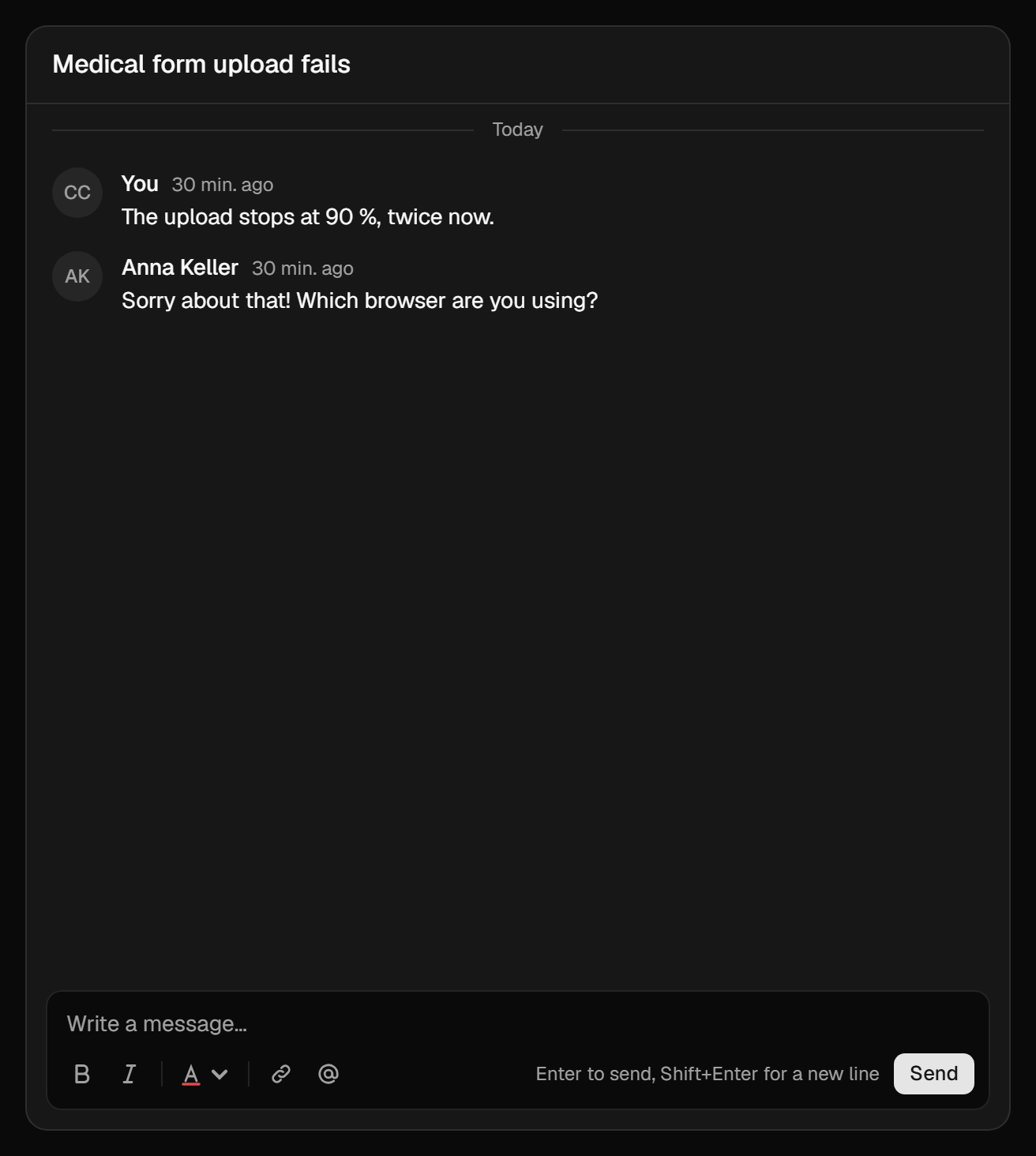
- Start from the shadcn registry. Ready components (panel, feed, message, composer, thread, channel tabs, reactions) copied into your project, in shadcn's look, built on the hooks. You own the code and change what you like. See shadcn registry.
- Build your own on the hooks. The behaviour (windows, paging, the divider, optimistic sends, drafts, retry) lives in
/reacthooks; you draw the markup. See Headless.
The two mix: take the registry panel, then replace its message component with your own markup on useMessage.
A working reference
The plugin's dev app carries a small website under packages/conversations/dev/app/(frontend): Tailwind v4, shadcn primitives, a customer login, /support with the customer's tickets, and /support/<id> with the ticket's conversation over Pusher, with reactions and a custom text colour feature. The support tickets recipe walks through it end to end.