Support tickets
A ticket system where customers write on your website and staff answer in the admin, with staff-only notes, closed tickets frozen, and status changes in the feed.
This recipe builds support tickets from the core: every ticket is a conversation, customers read and answer theirs on the website, staff work in the ticket's edit view, and a closed ticket stays readable but takes no more messages. It is the tickets instance of the plugin's dev app, which you can run with pnpm dev conversations.
What you end up with:
- A
ticketscollection. Its edit view shows the conversation right in the form. - Two channels: Conversation (customer and staff) and Notes (staff only).
- Customers see their own tickets only. Closed tickets are read only for everyone.
- Staff can mention staff; customers can mention nobody.
- A customer page on the website, from the shadcn registry.
- Realtime over Pusher (or Soketi), which works on serverless hosts.
- Status changes posted into the feed by the server.
The collection
import type { CollectionConfig } from 'payload'

export const Tickets: CollectionConfig = {
  slug: 'tickets',
  admin: { group: 'Support', useAsTitle: 'subject', defaultColumns: ['subject', 'status'] },
  fields: [
    { name: 'subject', type: 'text', required: true },
    { name: 'customer', type: 'relationship', relationTo: 'customers' },
    {
      name: 'status',
      type: 'select',
      defaultValue: 'open',
      options: ['open', 'closed'],
      admin: { description: 'Closed tickets are read only.' },
    },
    // The conversation in the form, composed from the plugin's primitives (below).
    {
      name: 'conversation',
      type: 'ui',
      admin: { components: { Field: '/components/TicketConversation#TicketConversation' } },
    },
  ],
}
The ticket holds no reference to its conversation. The conversation's key is derived from it: collection:tickets:<id>.
customers is an ordinary auth collection next to your admin users.
The instance
import { conversations, defineMessageType, perTarget, pusherTransport } from '@10x-media/conversations'
import { reactions } from '@10x-media/conversations/reactions'
import type { Where } from 'payload'

const isStaff = (req) => req.user?.collection === 'users'

export const ticketStatus = defineMessageType<{ from: string; to: string }>()({
  slug: 'ticket.status',
  Component: '/components/TicketStatus#TicketStatus',
  validate: (data) => (data?.to ? true : 'to is required'),
})

conversations({
  slug: 'tickets',
  users: ['users', 'customers'],
  targets: { collections: { tickets: { channels: ['conversation', 'notes'] } } },

  // One batch for every ticket on screen: staff see all, a customer their own.
  // A closed ticket stays readable and takes no writes.
  access: perTarget(
    ({ doc, req }) => {
      const mine = isStaff(req) || String(doc?.customer ?? '') === String(req.user?.id)
      if (!mine) return false
      return doc?.status === 'closed' ? { read: true, create: [] } : true
    },
    { load: true }
  ),

  channels: [
    {
      slug: 'conversation',
      label: 'Conversation',
      // Staff see who reads this; the customer is the audience and needs no warning.
      cue: ({ req }) => (isStaff(req) ? { label: 'Visible to the customer', tone: 'warning' } : null),
      access: { read: () => true, create: () => true },
    },
    {
      slug: 'notes',
      label: 'Notes',
      cue: { label: 'Staff only', tone: 'neutral' },
      access: { read: ({ req }) => isStaff(req), create: ({ req }) => isStaff(req) },
    },
  ],

  // Staff mention staff; customers mention nobody. Enforced on the server,
  // in the search and in saved messages.
  mentions: {
    users: ({ collection, req }): Where =>
      isStaff(req) && collection === 'users' ? {} : { id: { exists: false } },
  },

  types: [ticketStatus],
  extensions: [reactions({ storage: 'message' })],

  transport: pusherTransport({
    appId: process.env.PUSHER_APP_ID!,
    key: process.env.PUSHER_KEY!,
    secret: process.env.PUSHER_SECRET!,
    cluster: 'eu',
  }),

  hooks: {
    afterMessage: async ({ message, operation, req }) => {
      // Enqueue an email to the customer when staff answer in Conversation.
    },
  },
})
The parts, and where they are explained in detail:
{ read: true, create: [] }is a target grant: every channel readable, none writable. Sends, edits and deletes answer 403, the UI shows a read-only line instead of the composer, and reactions freeze too. See Access.- Channel rules see only the user, never the ticket. That is why "the customer's own ticket" and "closed" live in
access, and "staff only" lives on the channel. - The cue as a function answers per viewer, so the customer's composer shows no "Visible to the customer" line.
mentions.usersreturns aWhereper users collection.{ id: { exists: false } }matches nobody.pusherTransportsignals changes through Pusher or a compatible server such as Soketi. The browser subscribes with the same tokens the endpoints issue, so no query runs per subscription. See Transport. For a long-running Node host,sseTransport()needs no service at all.reactions({ storage: 'message' })keeps reactions on the message itself, with no extra collection. See Reactions.
The conversation in the ticket form
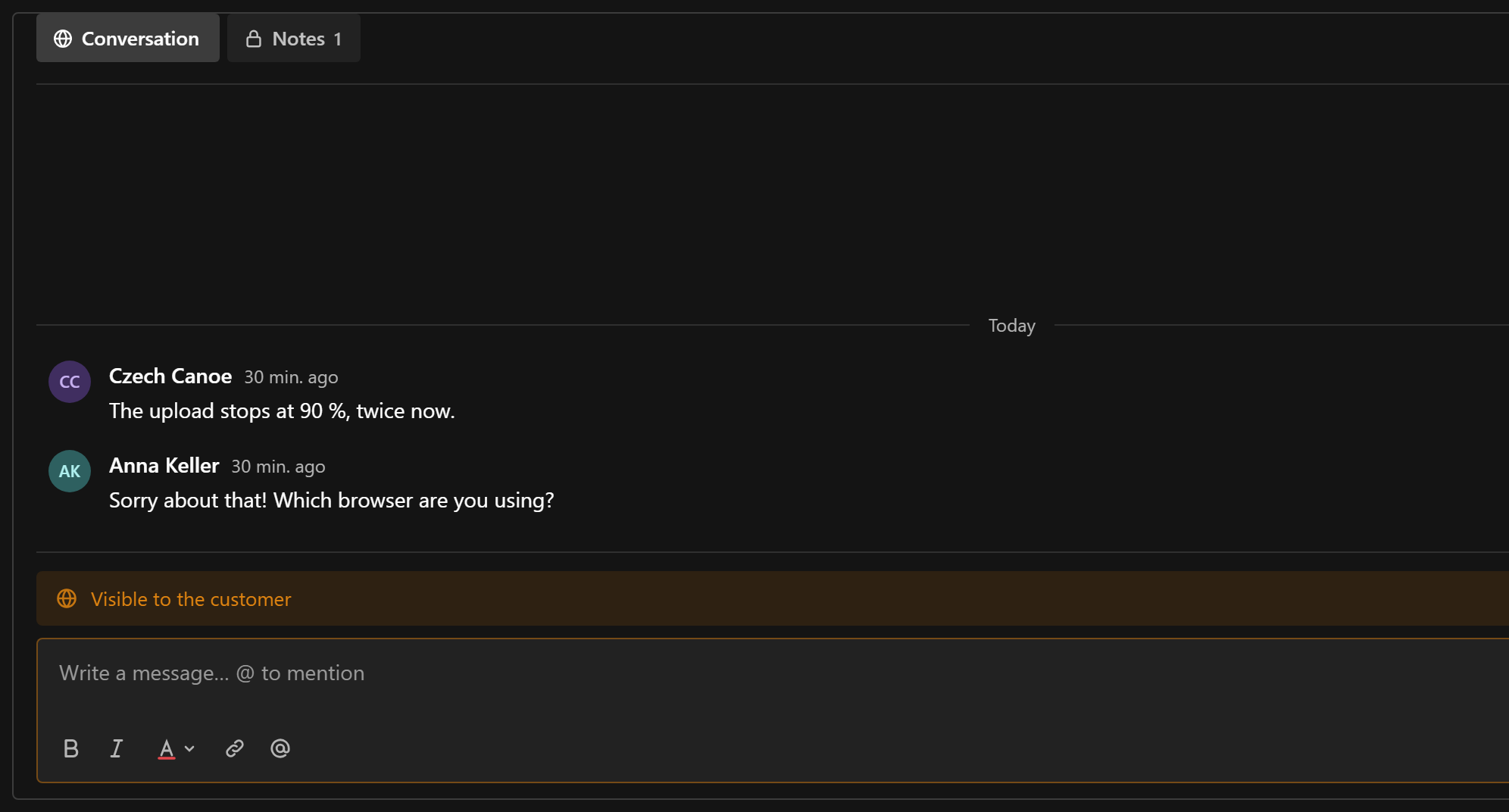
The plugin ships primitives, and the conversation in a form is project code composed from them. A ui field renders ChatPanel for the document being edited:
'use client'

import { ChatPanel } from '@10x-media/conversations/client'
import { ChatScope, collectionKey } from '@10x-media/conversations/react'
import { useDocumentInfo } from '@payloadcms/ui'

import './ticket-conversation.css'

export const TicketConversation = () => {
  const { id } = useDocumentInfo()
  if (id === undefined || id === null) {
    return <p>Save the ticket to start the conversation.</p>
  }
  return (
    <ChatScope instance="tickets">
      <div className="conversations-inline">
        <ChatPanel
          conversationKey={collectionKey('tickets', id)}
          instance="tickets"
          threadSlug={`ticket-${String(id)}-thread`}
        />
      </div>
    </ChatScope>
  )
}
ChatScope picks the tickets instance's provider, which the plugin registers in the admin. ChatPanel draws the tabs, feed and composer; threads open as a drawer under threadSlug. ChatPanel fills its parent's column, so the wrapper is yours to size; import a stylesheet next to the component:
.conversations-inline {
  display: flex;
  flex-direction: column;
  height: min(70vh, 40rem);
  min-height: 0;
  border: 1px solid var(--theme-elevation-150);
  border-radius: var(--style-radius-m);
  padding: 0 calc(var(--base) * 0.75) calc(var(--base) * 0.5);
  overflow: hidden;
}
More on composing admin views: Custom views.
A ticket system that prefers a button in the document controls instead uses comments() on the tickets collection. Both can coexist.
Status changes in the feed
When staff close a ticket, post a ticket.status message from a collection hook. It shows up in the feed like any message, and moves every open window through the transport:
import { collectionKey, postMessage } from '@10x-media/conversations'

hooks: {
  afterChange: [
    async ({ doc, previousDoc, operation, req }) => {
      if (operation !== 'update' || doc.status === previousDoc.status) return
      await postMessage(req, {
        instance: 'tickets',
        key: collectionKey('tickets', doc.id),
        channel: 'conversation',
        type: 'ticket.status',
        data: { from: previousDoc.status, to: doc.status },
      })
    },
  ],
},
postMessage runs no instance access (it is server code), but the collection hooks run: the type's validate, counters, afterMessage. The author is req.user unless you pass author: 'users:<id>'. Because ticket.status is not clientCreatable, the browser can never send one.
The type's Component draws it in the admin. A server component gets the viewer's req:
import type { ChatServerSlotProps } from '@10x-media/conversations/rsc'

export const TicketStatus = ({ message }: ChatServerSlotProps) => {
  const data = (message?.data ?? {}) as { from?: string; to?: string }
  return (
    <div>
      Status changed from <strong>{data.from}</strong> to <strong>{data.to}</strong>
    </div>
  )
}
On the website, draw it through renderType on ConversationUIProvider. More on types: Messages.
The customer's page
Customers log in through Payload's POST /api/customers/login, which sets the session cookie the conversation endpoints read. Their ticket list is an ordinary Payload query; the ticket page is the registry's ConversationPanel:
'use client'

import { ChatProvider, type ClientTransportSpec, collectionKey, transportFromSpec } from '@10x-media/conversations/react'
import { useState } from 'react'

import { ConversationPanel } from '@/components/conversations/conversation-panel'
import { ConversationUIProvider } from '@/components/conversations/conversation-ui'
import { reactionSlots } from '@/components/conversations/conversation-reactions'

export function SupportChat({ subject, ticketId, transport }: {
  subject: string
  ticketId: string
  transport?: ClientTransportSpec
}) {
  const [client] = useState(() => transportFromSpec(transport))
  return (
    <ChatProvider instance="tickets" transport={client}>
      <ConversationUIProvider
        slots={reactionSlots}
        renderType={(message) =>
          message.type === 'ticket.status' ? (
            <p className="text-muted-foreground text-sm">
              Status: {(message.data as { to?: string })?.to}
            </p>
          ) : null
        }
      >
        <ConversationPanel
          className="h-[70vh]"
          conversationKey={collectionKey('tickets', ticketId)}
          header={<h2 className="font-medium">{subject}</h2>}
        />
      </ConversationUIProvider>
    </ChatProvider>
  )
}
The server page that renders it, and passes getInstance({ payload }, 'tickets').transport?.client as transport, is on shadcn registry. The customer never sees the Notes tab: the channel's read rule leaves it out of everything the endpoints return.
Running it locally
The dev app has all of this: pnpm dev conversations, then docker compose -f packages/conversations/docker-compose.dev.yml up -d for Soketi (without it the tickets fall back to polling). Staff log in at /admin as dev@10xmedia.de, a customer at /support as customer@example.com, both with the password password. Use a private window for the customer: Payload keeps one session cookie for all auth collections.
Transport and realtime
How clients learn about new messages - polling, Server-Sent Events, or a Pusher-compatible service - and how several server processes share changes.
Chat rooms
A Slack-like staff chat in the admin, with rooms as documents, threads, reactions, archived rooms frozen, and realtime over Server-Sent Events.