Chat rooms
A Slack-like staff chat in the admin, with rooms as documents, threads, reactions, archived rooms frozen, and realtime over Server-Sent Events.
A chat room is a document, and the document is the conversation's target. This recipe builds a staff chat at /admin/chat from the plugin's primitives: a room list with unread counts, the open room's feed and composer, and its threads in a side pane. It is the chat instance of the plugin's dev app.
The plugin ships no chat view. Everything below the config is project code, composed from /client components and /react hooks, which is the point: your chat looks like your product.
Rooms
import type { CollectionConfig } from 'payload'

export const Rooms: CollectionConfig = {
  slug: 'rooms',
  admin: { group: 'Chat', useAsTitle: 'name' },
  fields: [
    { name: 'name', type: 'text', required: true },
    { name: 'topic', type: 'text' },
    { name: 'archived', type: 'checkbox', admin: { description: 'Archived rooms are read only.' } },
  ],
}
The instance
import { conversations, perTarget, sseTransport } from '@10x-media/conversations'
import { reactions } from '@10x-media/conversations/reactions'

const isStaff = (req) => req.user?.collection === 'users'

conversations({
  slug: 'chat',
  users: ['users'],
  targets: { collections: { rooms: { channels: ['messages'] } } },

  // An archived room stays readable but takes no new messages, edits, deletes or reactions.
  access: perTarget(
    ({ doc, req }) => isStaff(req) && (doc?.archived ? { read: true, create: [] } : true),
    { load: true }
  ),

  channels: [
    {
      slug: 'messages',
      label: 'Messages',
      access: { read: ({ req }) => isStaff(req), create: ({ req }) => isStaff(req) },
    },
  ],

  // Realtime: one stream per browser, served by Payload itself.
  transport: sseTransport(),

  extensions: [
    reactions({ emojis: ['👍', '❤️', '😂', '🎉', '🙏', '👀', '🚀', '✅'], storage: 'message' }),
  ],
})- One channel per room. A room is its own target, so "a channel per room" is simply one channel,
messages, on every room. Channels are for audiences inside one conversation (staff notes next to a customer thread), not for splitting a chat into rooms. - Archived rooms answer with the grant
{ read: true, create: [] }. See Access. sseTransport()streams change signals from Payload itself, no separate service. On several server processes the default bus carries changes between them; see Transport for buses and hosting.storage: 'message'keeps reactions on the message: no extra collection and no extra query per page, which suits a busy chat. See Reactions.
The view
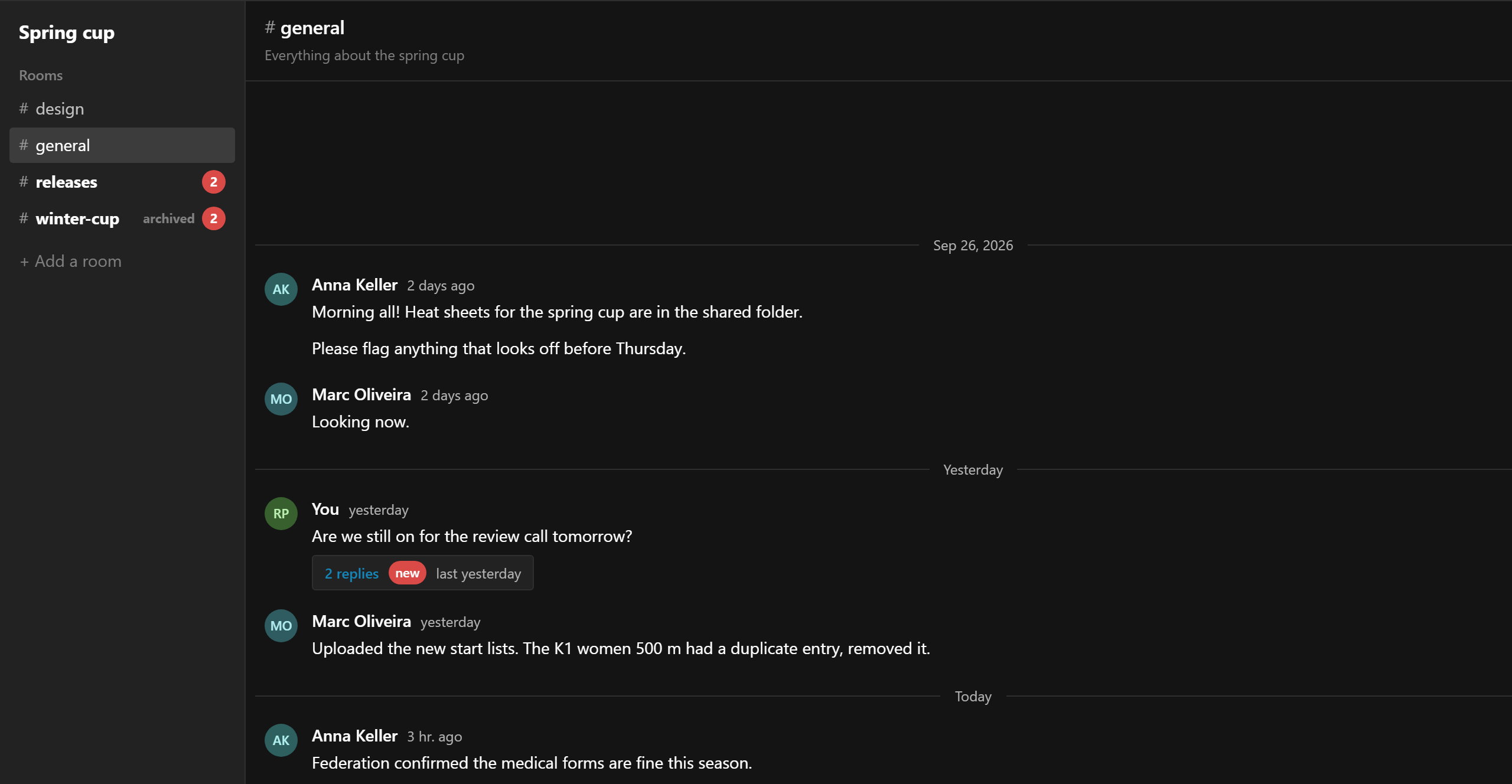
Register an admin view and a nav link:
admin: {
  components: {
    afterNavLinks: ['/chat/ChatNavLink#ChatNavLink'],
    views: {
      chat: { Component: '/chat/ChatView#ChatView', path: '/chat', exact: true, meta: { title: 'Chat' } },
    },
  },
},
The server view loads the rooms the user may see and hands them to a client component inside Payload's DefaultTemplate:
import { DefaultTemplate } from '@payloadcms/next/templates'
import type { AdminViewServerProps } from 'payload'

import { ChatApp } from './ChatApp'

export const ChatView = async ({ initPageResult, params, searchParams }: AdminViewServerProps) => {
  const { payload, user } = initPageResult.req
  const result = user
    ? await payload.find({ collection: 'rooms', depth: 0, limit: 100, sort: 'name' })
    : { docs: [] }
  const rooms = result.docs.map((doc) => ({
    id: String(doc.id),
    name: doc.name,
    topic: doc.topic ?? '',
    archived: Boolean(doc.archived),
  }))
  return (
    <DefaultTemplate
      i18n={initPageResult.req.i18n}
      locale={initPageResult.locale}
      params={params}
      payload={payload}
      permissions={initPageResult.permissions}
      searchParams={searchParams}
      user={user ?? undefined}
      visibleEntities={initPageResult.visibleEntities}
    >
      <ChatApp rooms={rooms} />
    </DefaultTemplate>
  )
}
The client side is three parts: the room list, the room, and the thread pane.
'use client'

import { ChatComposer, ChatFeed, ChatThread } from '@10x-media/conversations/client'
import {
  ChatScope,
  collectionKey,
  useChannels,
  useConversation,
  useUnread,
  type WindowMessage,
} from '@10x-media/conversations/react'
import { useState } from 'react'

type Room = { id: string; name: string; topic: string; archived: boolean }

const INSTANCE = 'chat'
const CHANNEL = 'messages'
const roomKey = (room: Room) => collectionKey('rooms', room.id)

export const ChatApp = ({ rooms }: { rooms: Room[] }) => {
  const [activeId, setActiveId] = useState(rooms[0]?.id ?? null)
  const [thread, setThread] = useState<WindowMessage | null>(null)
  const room = rooms.find((entry) => entry.id === activeId)
  return (
    <ChatScope instance={INSTANCE}>
      <div className="chat">
        <RoomList
          activeId={activeId}
          rooms={rooms}
          onSelect={(id) => {
            setThread(null)
            setActiveId(id)
          }}
        />
        {room ? <RoomView key={room.id} room={room} thread={thread} onThread={setThread} /> : null}
      </div>
    </ChatScope>
  )
}

/** Unread counts for every room in one request. */
const RoomList = ({ activeId, rooms, onSelect }: {
  activeId: string | null
  rooms: Room[]
  onSelect: (id: string) => void
}) => {
  const unread = useUnread(rooms.map(roomKey))
  return (
    <nav>
      {rooms.map((room) => {
        const count = unread[roomKey(room)]?.[CHANNEL] ?? 0
        return (
          <button key={room.id} onClick={() => onSelect(room.id)} type="button">
            # {room.name}
            {count > 0 && room.id !== activeId ? <span>{count}</span> : null}
          </button>
        )
      })}
    </nav>
  )
}

const RoomView = ({ room, thread, onThread }: {
  room: Room
  thread: WindowMessage | null
  onThread: (message: WindowMessage | null) => void
}) => {
  const key = roomKey(room)
  const { channels, viewer } = useChannels(key, { count: false })
  const channel = channels.find((entry) => entry.slug === CHANNEL)
  const conversation = useConversation({ key, channel: CHANNEL })
  // Keep the open thread's root current as the feed updates (reply counts, edits).
  const root = thread ? (conversation.messages.find((m) => m.id === thread.id) ?? thread) : null
  if (!channel) return null

  return (
    <>
      <section>
        <h2># {room.name}</h2>
        <ChatFeed
          conversation={conversation}
          instance={INSTANCE}
          onOpenThread={onThread}
          readOnly={!channel.canCreate}
          empty={<strong>This is the very beginning of #{room.name}.</strong>}
        />
        <ChatComposer
          channel={CHANNEL}
          conversationKey={key}
          instance={INSTANCE}
          placeholder={`Message #${room.name}`}
          disabledReason={channel.canCreate ? undefined : 'This room is archived: read only.'}
        />
      </section>
      {root ? (
        <aside>
          <button onClick={() => onThread(null)} type="button">Close thread</button>
          <ChatThread
            authors={conversation.authors}
            channel={channel}
            instance={INSTANCE}
            key={String(root.id)}
            root={root}
            viewer={viewer}
          />
        </aside>
      ) : null}
    </>
  )
}
What each piece brings:
ChatScopepoints the hooks and components at thechatinstance's provider, which the plugin registers in the admin.useUnreadsubscribes every room in one request and returns unread counts per channel. WithsseTransportthe counts update as messages arrive.ChatFeedis the whole scrolling behaviour: "Load earlier", opening at "New messages", the "N new" pill, day separators, grouping. Reactions appear under each message and in its menu through the extension's slots, with no code here.ChatComposeris the Lexical composer with mentions,/commands and links.disabledReasonreplaces it in an archived room.ChatThreadshows a root with its replies as their own window and a reply composer. Here it sits in a side pane;ChatPanelwould open it as a stacked drawer instead.
The dev app's version (packages/conversations/dev/chat/) adds the room from the URL, a field to create rooms, and CSS for the three-column layout. For the components' props and slots see Admin UI; for a view that looks entirely your own, the same behaviour is available as hooks (Headless).
Variations
- Rooms for customers or members on your website: the same instance with the website's users collection in
users, and the page built from the shadcn registry or the hooks. - Private rooms: add a
membersrelationship to rooms and check it inaccess. It runs once per request for every room on screen, so one query answers for the whole list. - Mentions as notifications:
hooks.afterMentionreceives every newly mentioned user, already filtered to people who can read the room. Enqueue a job there rather than sending mail inline.
Support tickets
A ticket system where customers write on your website and staff answer in the admin, with staff-only notes, closed tickets frozen, and status changes in the feed.
Multi-tenant
Conversations with @payloadcms/plugin-multi-tenant. Tenant checks live in conversation access, mentions stay inside the tenant, channel rules stay per user.