Custom views
Compose your own admin surfaces from the primitives, a conversation inside a form, a full chat view, badges in lists.
The plugin ships primitives plus the comments() drawer. Any other admin surface (a ticket's conversation right in its form, a chat view with rooms, an inbox) is project code, composed from the same components. The dev app of the plugin carries working examples of each.
Every surface below runs under the provider the plugin already registers in the admin, so there is no provider to add. What you add is ChatScope, to say which instance the subtree talks to.
A conversation inside a form
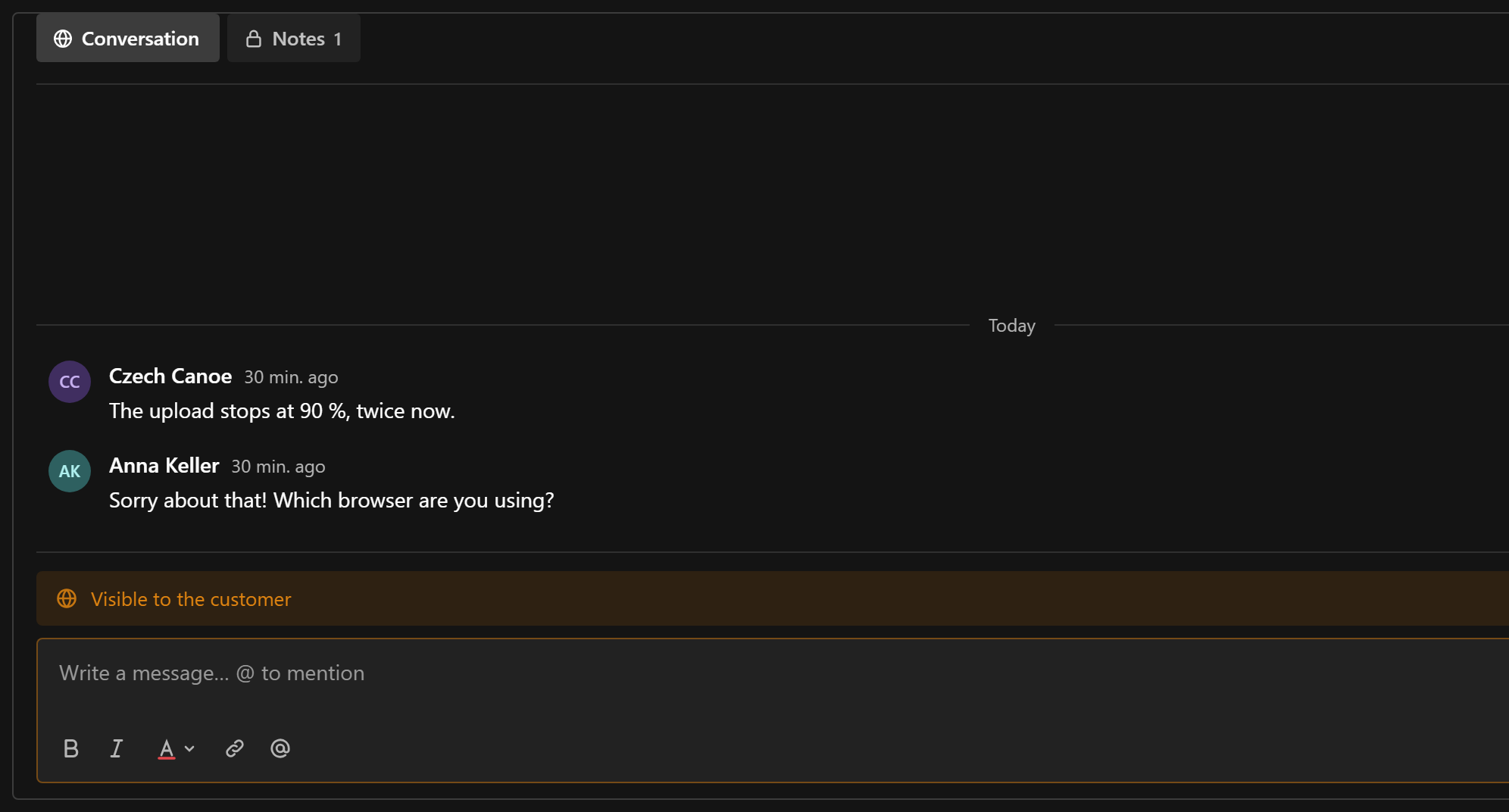
A ui field whose component renders ChatPanel puts the conversation into the edit view, with tabs, feed, composer, and threads in a drawer:
{
  name: 'conversation',
  type: 'ui',
  admin: { components: { Field: '/components/TicketConversation#TicketConversation' } },
}'use client'
import { ChatPanel } from '@10x-media/conversations/client'
import { ChatScope, collectionKey } from '@10x-media/conversations/react'
import { useDocumentInfo } from '@payloadcms/ui'
export const TicketConversation = () => {
const { id } = useDocumentInfo()
if (id === undefined || id === null) {
return <p>Save the ticket to start the conversation.</p>
}
return (
<ChatScope instance="tickets">
<div className="ticket-conversation">
<ChatPanel
conversationKey={collectionKey('tickets', id)}
instance="tickets"
threadSlug={`ticket-${String(id)}-thread`}
/>
</div>
</ChatScope>
)
}ChatPanel fills its parent's column, so give the wrapper a height and let the feed scroll inside it:
.ticket-conversation {
  display: flex;
  flex-direction: column;
  height: min(70vh, 40rem);
  min-height: 0;
  overflow: hidden;
}
A create view has no id yet, so there is no key: show a hint instead. Wrap the panel in ChatRichTextProvider when the instance uses rich text of its own. The full ticket setup is in Support tickets.
A full admin view
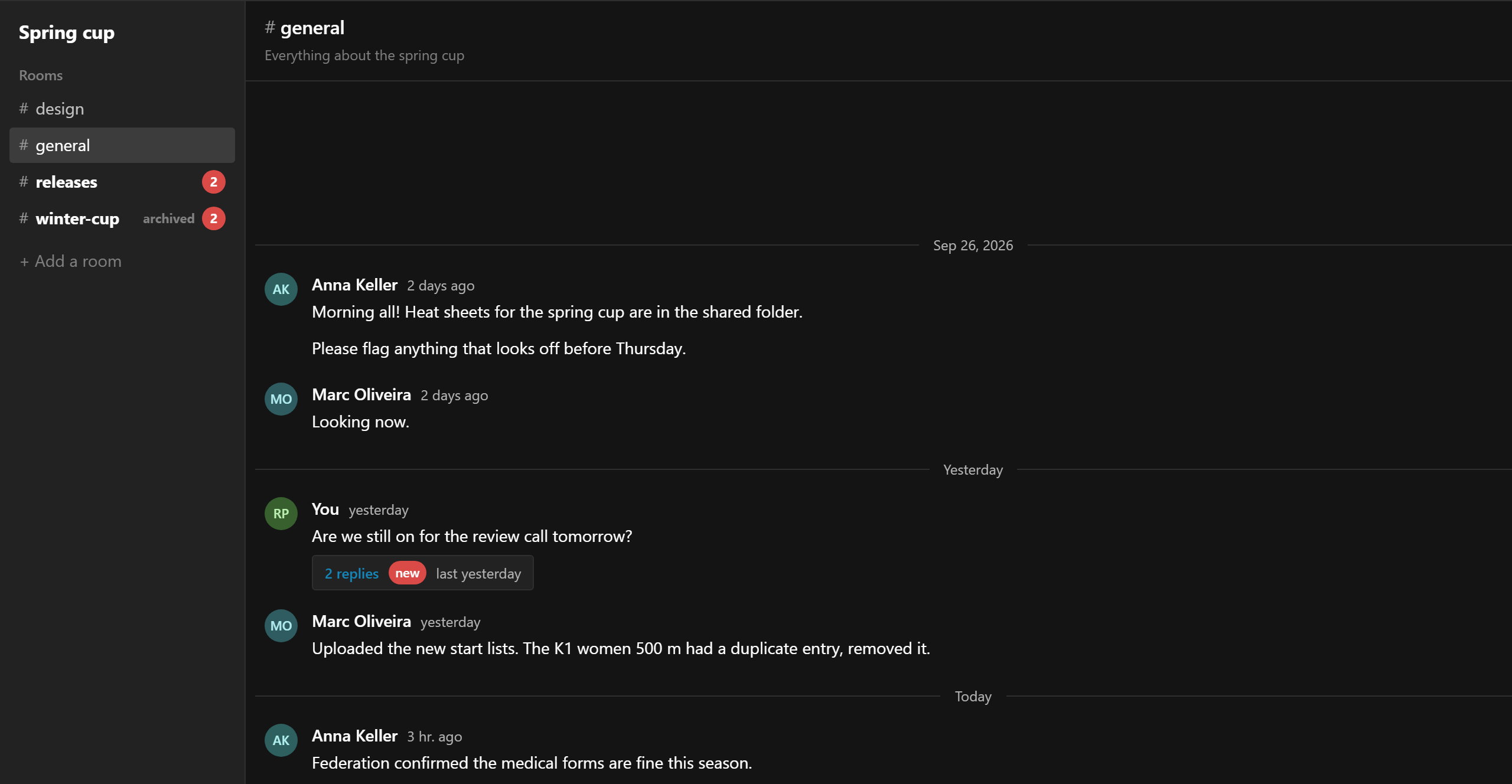
For a chat with rooms, register a custom admin view and a nav link:
admin: {
  components: {
    afterNavLinks: ['/chat/ChatNavLink#ChatNavLink'],
    views: {
      chat: { Component: '/chat/ChatView#ChatView', path: '/chat', exact: true, meta: { title: 'Chat' } },
    },
  },
},
The view is a server component that loads what the page needs (the rooms the user may see) and renders a client app inside Payload's DefaultTemplate, so the admin's nav and header stay:
import { DefaultTemplate } from '@payloadcms/next/templates'
import type { AdminViewServerProps } from 'payload'

import { ChatApp } from './ChatApp'

export const ChatView = async ({ initPageResult, params, searchParams }: AdminViewServerProps) => {
  const { payload, user } = initPageResult.req
  const rooms = user
    ? (await payload.find({ collection: 'rooms', depth: 0, limit: 100, sort: 'name' })).docs
    : []
  return (
    <DefaultTemplate
      i18n={initPageResult.req.i18n}
      locale={initPageResult.locale}
      params={params}
      payload={payload}
      permissions={initPageResult.permissions}
      searchParams={searchParams}
      user={user ?? undefined}
      visibleEntities={initPageResult.visibleEntities}
    >
      <ChatApp rooms={rooms.map((room) => ({ id: String(room.id), name: room.name }))} />
    </DefaultTemplate>
  )
}
The client side drops below ChatPanel and arranges ChatFeed, ChatComposer and ChatThread itself, here with the thread in a side pane rather than a drawer:
'use client'
import { ChatComposer, ChatFeed, ChatThread } from '@10x-media/conversations/client'
import {
  ChatScope,
  collectionKey,
  useChannels,
  useConversation,
  type WindowMessage,
} from '@10x-media/conversations/react'
import { useState } from 'react'

const Room = ({ roomId }: { roomId: string }) => {
  const key = collectionKey('rooms', roomId)
  const { channels, viewer } = useChannels(key, { count: false })
  const channel = channels.find((entry) => entry.slug === 'messages')
  const conversation = useConversation({ key, channel: 'messages' })
  const [thread, setThread] = useState<WindowMessage | null>(null)
  // Keep the open root current as the feed updates (reply counts, edits).
  const root = thread ? (conversation.messages.find((m) => m.id === thread.id) ?? thread) : null
  if (!channel) return null
  return (
    <div className="chat-room">
      <main>
        <ChatFeed
          conversation={conversation}
          instance="chat"
          onOpenThread={setThread}
          readOnly={!channel.canCreate}
        />
        <ChatComposer
          channel="messages"
          conversationKey={key}
          disabledReason={channel.canCreate ? undefined : 'This room is archived.'}
          instance="chat"
        />
      </main>
      {root ? (
        <aside>
          <ChatThread
            authors={conversation.authors}
            channel={channel}
            instance="chat"
            key={String(root.id)}
            root={root}
            viewer={viewer}
          />
        </aside>
      ) : null}
    </div>
  )
}

export const ChatApp = ({ rooms }: { rooms: Array<{ id: string; name: string }> }) => {
  const [active, setActive] = useState(rooms[0]?.id)
  return (
    <ChatScope instance="chat">
      <RoomList onSelect={setActive} rooms={rooms} />
      {active ? <Room key={active} roomId={active} /> : null}
    </ChatScope>
  )
}
useChatPanel gives the same state ChatPanel uses (channels, the current one, its feed, the open thread) if you want tabs without the drawer. The whole chat is in Chat rooms.
Unread badges in a list
useUnread(keys) returns { [key]: { [channel]: count } } for many conversations at once. The keys are subscribed together, in one request per tick however many rows mount:
'use client'
import { collectionKey, useUnread } from '@10x-media/conversations/react'

const RoomList = ({ rooms, onSelect }) => {
  const unread = useUnread(rooms.map((room) => collectionKey('rooms', room.id)))
  return rooms.map((room) => {
    const count = unread[collectionKey('rooms', room.id)]?.messages ?? 0
    return (
      <button key={room.id} onClick={() => onSelect(room.id)} type="button">
        # {room.name} {count > 0 ? <span>{count > 99 ? '99+' : count}</span> : null}
      </button>
    )
  })
}
For a count and unread dot per row (a list view cell), useChannels(key) returns count and unread for one key; mounts in the same tick still share one request.
A trigger anywhere
ChatTrigger reads its key from the document being edited. Outside an edit view, or for a conversation that is not the document itself, pass the key:
import { ChatTrigger } from '@10x-media/conversations/client'
import { customKey } from '@10x-media/conversations/react'

<ChatTrigger conversationKey={customKey('release:2026-10')} instance="comments" />
It scopes itself to instance, so it needs no ChatScope. The key must be one the instance serves (see targets in Concepts), and it must pass conversation access, or the trigger renders nothing.
A drawer of your own
To open a conversation from your own button, render ChatDrawer and open it by its modal slug with Payload's useModal:
'use client'
import { ChatDrawer } from '@10x-media/conversations/client'
import { ChatScope } from '@10x-media/conversations/react'
import { Button, useModal } from '@payloadcms/ui'

export const DiscussButton = ({ conversationKey }: { conversationKey: string }) => {
  const { openModal } = useModal()
  const slug = `discuss-${conversationKey.replace(/[^a-zA-Z0-9-]/g, '-')}`
  return (
    <ChatScope instance="comments">
      <Button buttonStyle="secondary" onClick={() => openModal(slug)}>
        Discuss
      </Button>
      <ChatDrawer conversationKey={conversationKey} drawerSlug={slug} instance="comments" title="Discussion" />
    </ChatScope>
  )
}
Modal slugs are global in the admin. Derive them from the instance and key (as above) so two buttons for one conversation share a drawer and two conversations never do. A thread opens under `${slug}-thread`.
Several instances on one screen
Each instance has its own provider in the admin; nested providers do not interfere. Wrap each subtree in its own ChatScope, and a subtree only ever talks to its instance:
<ChatScope instance="tickets">
  <TicketConversation />
</ChatScope>
<ChatScope instance="comments">
  <ChatTrigger conversationKey={key} instance="comments" />
</ChatScope>
Components and hooks outside any ChatScope use the nearest provider, which is whichever instance was registered last. Always scope explicitly in custom code.